• All prints completed within 24 hours
  • Local pickup available
  • Same day shipping!
  • Free shipping over $99
  • Same Day Pickup for 12 PM Order
DTF Delaware, DTF Printing, DTF Transfer By Size, Direct to Film, DTF Transfers, Blank Aprons

Custom Aprons

Regular price

$5.50

Tax and calculated at checkout.

Pickup available at DtfDelaware

Usually ready in 24 hours

Product Description

Product Specifation:

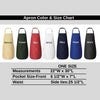
  • Crafted from a durable blend of 55% cotton and 45% polyester, providing a comfortable and long-lasting apron.
  • Adjustable neck strap with a sturdy buckle ensures a perfect fit for every wearer.
  • Equipped with two practical patch front pockets (6 1/2"W x 7"L) for easy storage of tools and essentials.
  • Waist side ties (25 1/2"L) made from the same fabric as the apron, adding both functionality and style.
  • Apron dimensions: 22"W x 30"L, providing ample coverage and protection during various activities.

How to place an order?

  1. Select Your T-Shirt Model: Start by choosing your preferred brand and style from the top buttons (e.g., Comfort Colors, Bella + Canvas Crew-Neck, or Bella + Canvas V-Neck).

  2. Choose Your Size: Click on the appropriate size button ranging from XS to 3XL.

  3. Pick a Color: Select your desired shirt color from the available color swatches. The name of the selected color will appear above the grid (e.g., Black).

  4. Configure Your Design Placement: Under the DESIGN section, check the boxes for where you want your artwork printed. Options include: Front, Back, Pocket Size, Sleeve

  5. Upload Your Artwork: Once you select a location, a specific upload box will appear for that area:

    Front Design: Click "Choose file" or drop your file into the box provided.

    Back Design: Use the dedicated back design box to upload your rear graphic.

    Pocket Design: Upload your small-scale logo or graphic to the pocket design section.

    Sleeve Design: Use the sleeve upload box to add a custom design or logo to the arm of your garment.

  6. Add Special Instructions: If you have specific requests regarding the placement or scale of your design, type them into the Note text box.

  7. Set Quantity and Add to Cart: Use the +/- buttons to choose the number of items you want, then click the Add to cart button to proceed to checkout.

Application Instructions

Heat Press:
  • 300–320°F
  • ⁠8–10 seconds
  • Medium to firm pressure
  • ⁠Hot or cold peel
  • ⁠Second press: 2–3 seconds with parchment/Teflon (optional)

Home Iron:
  • ⁠Highest heat setting (no steam)
  • ⁠Press firmly for 15–20 seconds
  • Cold peel
  • ⁠Quick 5-second second press (optional-recommended )

Thick Garments (hoodies, fleece):
  • ⁠If needed, lower heat to 290–300°F
  • Avoid overheating

Care Instructions
  • Wait 24 hours before the first wash
  • ⁠Wash inside out in cold water, gentle cycle
  • Air dry or tumble dry on low heat
  • Do not use bleach or fabric softeners
  • Do not iron directly on the transfer
  • ⁠For ironing: turn garment inside out or cover with parchment

Notes:
  • ⁠Teflon is not required on first press
  • Works on any garment

Shipping Information

Expect your order to be processed within 1 business day

You may also like…